Showing posts with label WAS 7. Show all posts

1/10/13

java core dump

Java Core Dump

Download the file windows_hang.py and copy the file to your <PROFILE_ROOT>\bin directory. If instead copied to <WAS_HOME>\bin, the default server, which may be the deployment manger (dmgr), will be accessed when wsadmin.bat is launched.


NOTE: This script only works for WebSphere Application Server 6.1 and higher.


If you are looking for the older windows_hang.bat that works with older releases of WebSphere Application Server, see the FAQ section.


To launch the script to produce 3 javacores spaced 2 minutes apart, run this command:

wsadmin -lang jython -f windows_hang.py -j -s SERVER_NAME

Replacing SERVER_NAME with your server's name.

If you have to run this number of times, on windows, you can write a batch file and run the batch file as Administrator.

<WAS_HOME>\profiles\<PROFILE_NAME>\bin\wsadmin -lang jython -username <username> -password <password> -f \<path_to_windows_hang.py>\windows_hang.py -j -s SERVER_NAME

ex.,
\"Program Files"\ibm\WebSphere\AppServer\profiles\AppSrv01\bin\wsadmin -lang jython -username blahblah -password blahblah -f \users\bramaraju\desktop\windows_hang.py -j -s server01

http://www-01.ibm.com/support/docview.wss?uid=swg21111364

11/7/12

AdminConsole throws 404

On one of the developer's RAD 7.5.5.1 box, WTE 7.0.0.21 admin console thows 404 when accessed.
http://localhost:admin_port/ibm/console is the standard URL.
*[11/6/12 12:53:57:159 CST] 00000012 webcontainer  E com.ibm.ws.webcontainer.WebContainer handleRequest SRVE0255E: A WebGroup/Virtual Host to handle /ibm/console/login.do has not been defined.*
This is the error message what it shows in the SystemOut.log.

AdminConsole is a systemApp that comes with the installation. There few commands using which one can remove the console and reinstall the app and even restore the app.
Solution :
1. Remove the AdminConsole application
2. Re install the AdminConsole application

1. Remove the AdminConsole -
Goto that profile\bin in which the problem is occurring,
start the server process in that profile.
Issue the following command from command line, with administrative privileges when running on windows
wsadmin -f deployConfig.py remove
This command removes the Adminconfig app.
Restart the server
2. Re install the AdminConsole application
Make sure the server is up and running,
Goto that profile where the issue is occurring,
issue the following command from command line, with administrative privileges when running on windows
wsadmin -f deployConfig.py install

This command installs the AdminConsole.
After successful exit from the command, bounce the server process.

Access the AdminConsole. It worked for me.

InfoCenter URL for the above quoted commands -

http://pic.dhe.ibm.com/infocenter/wasinfo/v6r1/index.jsp?topic=/com.ibm.websphere.base.doc/info/aes/ae/tcon_startstop.html

9/12/12

A composition unit with name MyApp already exists. Select a different application name.

Problem(Abstract)

A composition unit with name MyApp already exists. Select a different application name.

Cause

This is most frequently observed during the installation or removal of applications, but it may also turn up during other administration tasks such as deleting servers.
The issue maybe caused by WebSphere Application Server APAR PM20642.

In this scenario, if there is an error with the deployment of a module, then this bad deployment is saved, then the WebSphere Application Server configuration will be out of sync.

In WebSphere Process Server, this often happens with a module that has WebSphere Business Integration Adapter Resources that might not be complete or set up properly.
When deploying using WebSphere Integration Developer using "Add Projects", the configuration changes for this bad deployment are automatically saved.

Even after the application is removed, you might not be able to do any further or new application installs or uninstalls (even with a corrected module).

Resolving the problem

The manual workaround is to delete the /blas and /cus directories for the bad application from the configuration.
The resources will be located in the config directory of the profile.:

<profile name>/config/cells/qcell/blas
<profile name>/config/cells/qcell/cus

http://www-01.ibm.com/support/docview.wss?uid=swg21455322
--
Thanks and Regards

Bhaskar Ramaraju
http://www.linkedin.com/in/ramarajubhaskar

4/6/11

WASServiceCmd utility

I faced lot of issues with WebSphere services on Windows 2008 R2 64bit boxes.
WASService adds the WAS Services to Windows services list, but fails to stop/start them.

If I bounce the box, then services are getting started. If I stop them, it is setting the service status as blank. If I start it again, it throws "Windows could not start IBM WebSphere Application Server – servicename on local computer". When checked in the event logs "The IBM WebSphere Application Server V7.0 - CellManager01 service terminated with service-specific error %%134220456." is the message.


This is how I have added WAS Services to Windows Services

D:\IBM\WebSphere\AppServer\bin\WASService.exe -add CellManager01 -serverName dmgr -profilePath D:\IBM\WebSphere\AppServer\profiles\Dmgr01 -wasHome D:\IBM\WebSphere\AppServer -logFile D:\IBM\WebSphere\AppServer\profiles\Dmgr01\logs\dmgr\SystemOut.log -logRoot D:\IBM\WebSphere\AppServer\profiles\Dmgr01\logs\dmgr -restart true -startType automatic -stopArgs "-username xxxxxxxxx -password xxxxxxx" –encodeParams


To solve this, one can use WASServiceCmd Utility. This utility is easy to use, grabs all the info you need to pass, creates the service command, executes it.


Here is the technote about WASServiceCmd

http://www-01.ibm.com/support/docview.wss?rs=180&uid=swg21397335

Here is my WASServiceCmd log entry
wasservice.exe -add "CellManager01" -serverName "dmgr" -profilePath "D:\IBM\WebSphere\AppServer\profiles\Dmgr01" -encodeParams -stopArgs "-username xxxxxxxx -password ******** -startType automatic -restart true
wasservice.exe -add "Node01" -serverName "nodeagent" -profilePath "D:\IBM\WebSphere\AppServer\profiles\wlmprime01" -encodeParams -stopArgs "-username xxxxxxx -password ******** -startType automatic -restart true

These services are now, properly working.
 
--
Thanks and Regards

Bhaskar Ramaraju
http://www.linkedin.com/in/ramarajubhaskar

3/28/11

Elevated user privileges

Problem: I have edited a file, say, httpd.conf on Windows 2008 R2 64 bit server. I saved the file and bounced the apache. But, my changes were not in effect. I looked deep into it, then realized that, Windows is storing a copy of httpd.conf on Desktop in VirtualData folder, under this folder, created entire folder structure and stored the file in there.
To avoid this, edit the files or run the commands as an administrator or disable User Access Control (UAC).

Technote from IBM

Running WebSphere Application Server command-line tools might require elevated Microsoft Windows user account privileges

 Technote (troubleshooting)
 
Problem(Abstract)
To successfully use some IBM WebSphere Application Server command-line tools, you might need to explicitly elevate Microsoft Windows user account privileges if you are not using the built-in administrator account to run the commands. This action is applicable to the Windows 7, Windows Vista, Windows Server 2008 R2, and Windows Server 2008 operating systems only.

If Windows User Account Control (UAC) is disabled on your system, then this document is not applicable.
 

Cause
You must use a Windows user account that has full Administrator account privileges for certain operations on Windows 7, Windows Vista, Windows Server 2008 R2, and Windows Server 2008 operating systems. Commands that involve Windows services or access to the Windows system registry require that type of full authority due to the Windows User Account Control implementation for those two operating systems.


For example, if you use a regular administrator group account that is not the built-in Administrator account, then you will likely need to explicitly elevate your user account privileges when you run the launchpad or Profile management tool commands. This action assumes that your operating system is running with the default values for system-wide security policies that are related to the Windows User Account Control.


http://www-01.ibm.com/support/docview.wss?rs=180&context=SSEQTP&q1=Win7_2008_R2&uid=swg21315375&loc=en_US&cs=utf-8&lang=en
--
Thanks and Regards

Bhaskar Ramaraju
http://www.linkedin.com/in/ramarajubhaskar

3/10/10

Installation Issues

Mr.X installed WAS like this on Win 08 server-

Started to launcher.
Selected WAS installer.
The installer had successfully passed OS verification.
Then selected Cell Topology. WAS 6.1 and above gives you an option to install a Cell. Meaning, installer installs Dmgr, installs an appserver, and federates that to dmgr.
Now, with all the needed inputs, the installer started to install binaries, installed successfully dmgr, appserver and even successfully federated everything.

Now, as this guy didnt configured security at the time of installation, wants to do it in the post installation.

He did like this -
After immediately installing, he ran the ivt (installation verification test).
Then went to admin console, kicked in security setup process.

WHAT IS HE MISSING?

The error what he got was - after configuring security, he wanted to bounce the services, bounce dmgr, bounce node agent, bounce server.
server was failing to start.
dmgr cannot recognize server.

What to do?ADMR0111E is one of the errors.

2/27/10

WAS ND 7 Hypervisor Edition


This is vmware on Windows 7 64 bit.

1/31/10

WebSphere Hypervisor Setup

Well, Lets see what we need to for this.
WebSphere Hypervisor version 7. Follow this URL http://www-01.ibm.com/software/webservers/appserv/hypervisor/
You need to download the following


When searched in infocenter for hypervisor, it gave me very clear instructions. Here are those links
http://publib.boulder.ibm.com/infocenter/wasinfo/v7r0/index.jsp?topic=/com.ibm.websphere.virtualimages.doc/info/ae/ae/welcome_virtual.html
http://publib.boulder.ibm.com/infocenter/wasinfo/v7r0/index.jsp?topic=/com.ibm.websphere.virtualimages.doc/info/ae/ae/tins_virt_install_vmware_esx.html

So, you those files from IBM. Whatelse you need?

1. SLES 10, sp3.
Goto novell.com, get SuSE Linux Enterprise Edition.

2. VirtualBox -
http://www.virtualbox.org/
Download virtualbox, install it, create a suse virtual machine.

3. Get cygwin.
http://www.cygwin.com/

4. Before you begin, you need to mount these tgz files to cygwin.
When cygwin is installed it creates directories like this
Directory Structure

Cygwin attempts to duplicate the directory structure of a Linux System within the "c:\cygwin" folder:


To not waste time on mounting another directory into cygwin, simply copy those tgz files to c:\cygwin\tmp, which are avaliable thru cygwin shell.

5. Now, openup a cygwin shell.
You have downloaded tgz file. A tgz file is a gunzip file. To uncompress it, in general, one can use gunzip command.
gunzip filename.tgz
is an example.
Or, on linux platforms, tar gives a switch *z* to uncompress gz, tgz files
Now, at the cygwin prompt -
cd /tmp
tar xvzf filename.tgz
Use the above command and replace filename.tgz with all those four files.
This uncompresses tgz file to a tar file and tar file will be uncomplressed.
6. Above command creates files like
vmdk, vmx files.
7. For ease of use, I have created another directory say, c:\vmdk_files
and copied all these files into that directory. These are the files -
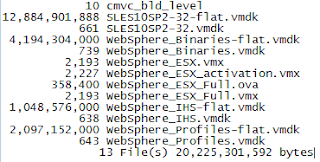

8. So, we have vmdk files, and virtual machine. By the way, what is a vmdk file? :)
vmdk = virtual machine disk.
When we create a virtual machine, it will create a hdd readable by it. virtualbox by default creates vdi file. vmdk is another kind of such virtual disk file. Now, we need to add that virtual disk to the virtual machine as a secondary disk.

9. This is how you do it -
Open ur virtualbox
point to the virtual machine

As pointed in the above, I have selected suse, under that, select *Storage*.
10.

As shown above, hit on that *Add Attachment*, it gives two options, add hard disk or cd/dvd/. Select, obviously, disk.
11.
So, we mounted these vmdsiks to our virtual machine. Lets start and see -
12. These 4 are the mounted disks -

1/30/10

tar

was.7005.nd.linux.vmware.esx.sles.os.tgz is big file, 2.33GB. When uncompress, its 12GB.


$tar xvfz was.7005.nd.linux.vmware.esx.sles.os.tgz
SLES10SP2-32-flat.vmdk
tar: SLES10SP2-32-flat.vmdk: Wrote only 4607 of 10240 bytes
SLES10SP2-32.vmdk
tar: Exiting with failure status due to previous errors


What to do??

1/29/10

vmdk disks

While I was going through Dileep Kumar's Blogpost WebSphere Hypervisor Edition and VirtualBox, Hypervisor version attracted me a lot. So, I wanted to tryout installation the Hypervisor version 7.0.0.5 on my VirtualBox.

I have lot to share on this and tomorrow I will publish that.